

React, Typescript, Tailwind CSS
TypeScript 7 - the compiler went native, and the language stayed put
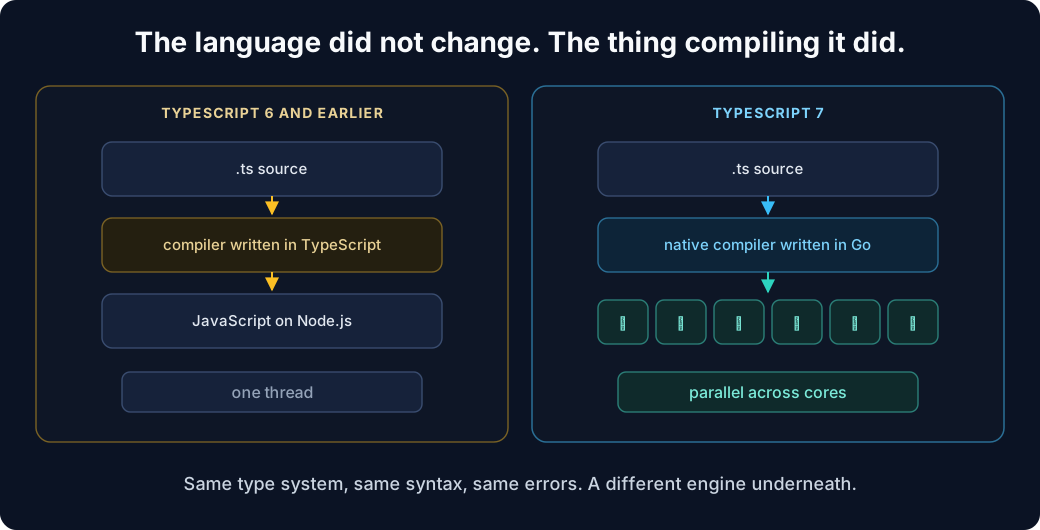
TypeScript 7.0 was released on 8 July 2026, and the headline is not new syntax. There is essentially no new syntax. The headline is that the compiler and language tooling have been ported from TypeScript to Go, and the whole thing now runs as native code across multiple cores.
For most releases, the interesting question is what can I write now that I couldn't before? For this one, the answer is "nothing much" - and that is the point.
The numbers are real
Microsoft published full-build benchmarks against real codebases rather than synthetic ones, which makes them worth looking at.
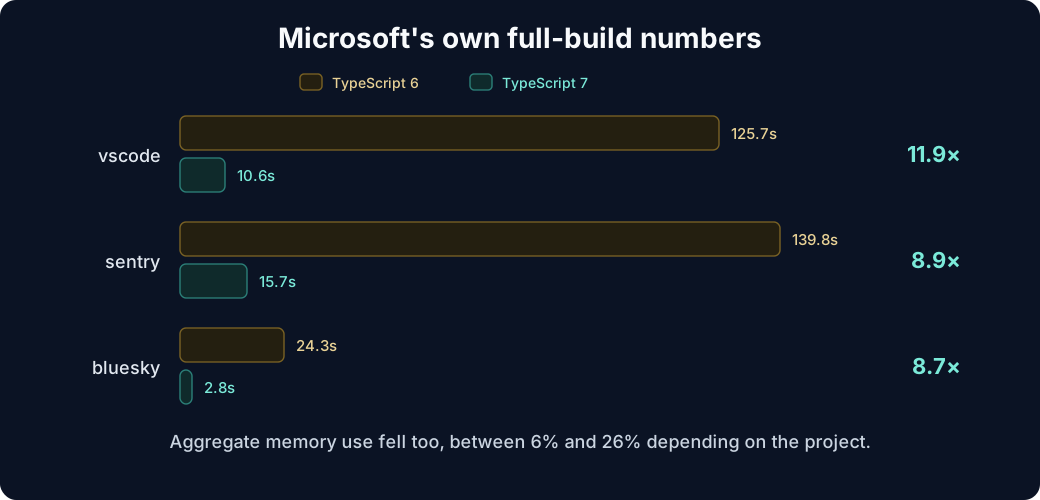
VS Code went from 125.7 seconds to 10.6. Sentry from 139.8 to 15.7. Bluesky from 24.3 to 2.8. Aggregate memory use fell too, between 6% and 26% depending on the project.
The gains come from three things stacked together: native code instead of JavaScript on Node, shared-memory multithreading instead of a single thread, and a pile of optimisations that only become available once you control memory layout.
Note the shape of those numbers. A two-minute build becoming ten seconds is a different kind of change from a two-minute build becoming ninety seconds. Ten seconds is inside the window where you keep your attention on the problem. Two minutes is where you go and read something else.
You don't need tsgo any more
During development the native compiler shipped under a separate tsgo binary so people could try it alongside the existing one. That is over. The ordinary install now gives you the native implementation:
npm install -D typescript
npx tsc
There are new flags for tuning how much parallelism you want:
tsc --checkers 4      # parallel type-checking
tsc --builders 4      # parallel project-reference builds
tsc --singleThreaded  # turn it all off
--singleThreaded is worth remembering. Constrained CI containers and debugging sessions are both cases where deterministic single-threaded behaviour beats raw speed.
The editor gets the same treatment
This isn't only about tsc. TypeScript 7's language service speaks LSP, the Language Server Protocol, so editors are no longer coupled to one implementation.
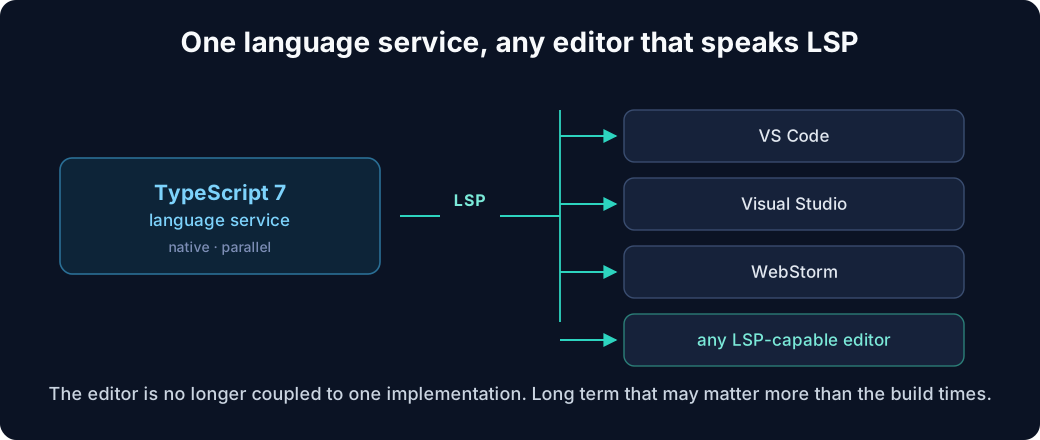
Project loading, diagnostics, completions and navigation all sit on the same native foundation, and the improvement is most noticeable exactly where the old service struggled: very large projects and monorepos.
Long term this may matter more than the build times. A protocol boundary means editor support stops being a bespoke integration per editor.
This is deliberately not a language release
An important framing point: TypeScript 7.0 is an engine rewrite, not a feature release.
The team's goal was to reproduce TypeScript 6.0's type-checking behaviour as closely as possible in Go. A TypeScript 6 project that compiles cleanly with the expected settings should generally behave identically under 7.
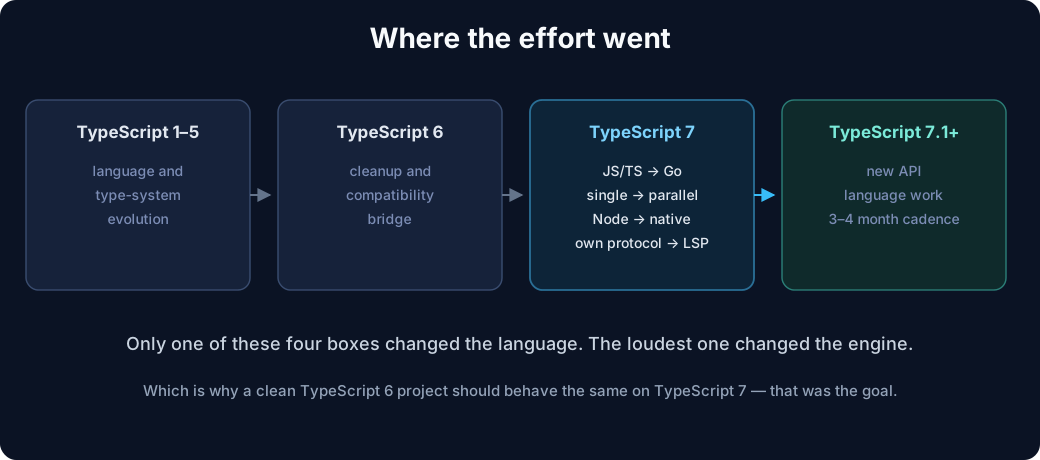
The payoff arrives after 7.0, once Microsoft can evolve the new implementation. Featureful releases are expected to return to roughly a 3–4 month cadence, with 7.1 next.
The defaults moved, and two of them will bite
This is where most migrations will actually spend their time. TypeScript 7 carries forward TypeScript 6's stricter configuration defaults.
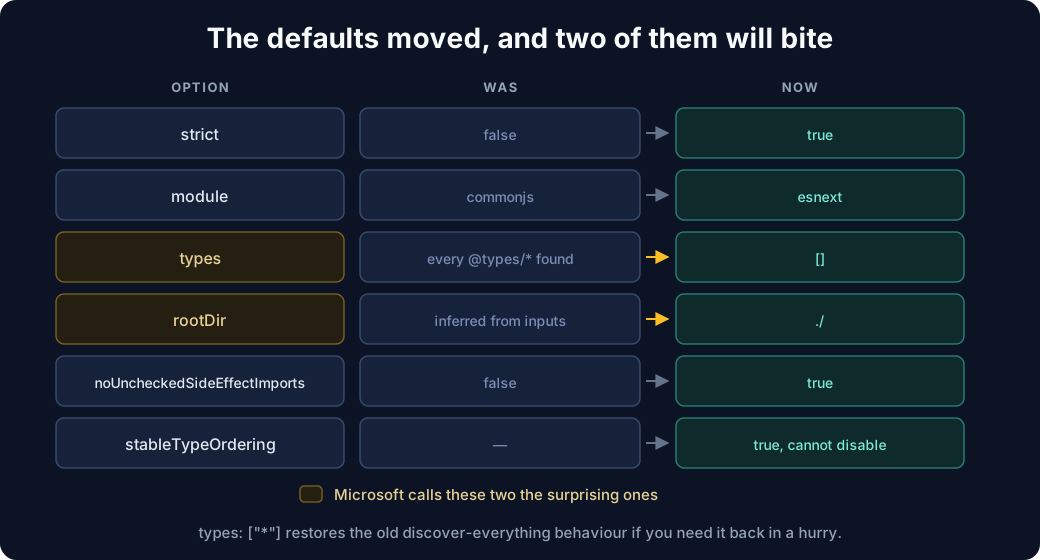
strict: true and module: "esnext" you were probably doing anyway. noUncheckedSideEffectImports: true is a straightforward win - it catches this, which used to pass silently:
import "./file-that-does-not-exist.css";
The two Microsoft explicitly calls surprising are the ones to plan for.
types now defaults to []. Previously a missing types array meant load every @types/* package you can find. Now an empty array means empty. So global type declarations have to be listed:
{
  "compilerOptions": {
    "types": ["node", "vitest"]
  }
}
The escape hatch, if you need it today
Setting "types": ["*"] restores the old discover-everything behaviour. Useful for getting a build green so you can migrate deliberately rather than under pressure - but treat it as a stepping stone. The explicit list is the version you want to end up with, because it is the one that tells you what your project actually depends on.
rootDir now defaults to ./ - the directory holding the config - rather than being inferred from your inputs. Projects whose tsconfig.json sits above their source directory need it stated:
{
  "compilerOptions": {
    "rootDir": "./src"
  },
  "include": ["src"]
}
That is a common monorepo layout, so this one will show up more often than its obscurity suggests.
Two more worth knowing: stableTypeOrdering is now true and cannot be turned off, and libReplacement defaults to false.
Go through 6. That is what 6 is for.
TypeScript 6 was the migration bridge: it turned a set of old behaviours into deprecation warnings. TypeScript 7 turns those same deprecations into hard errors.
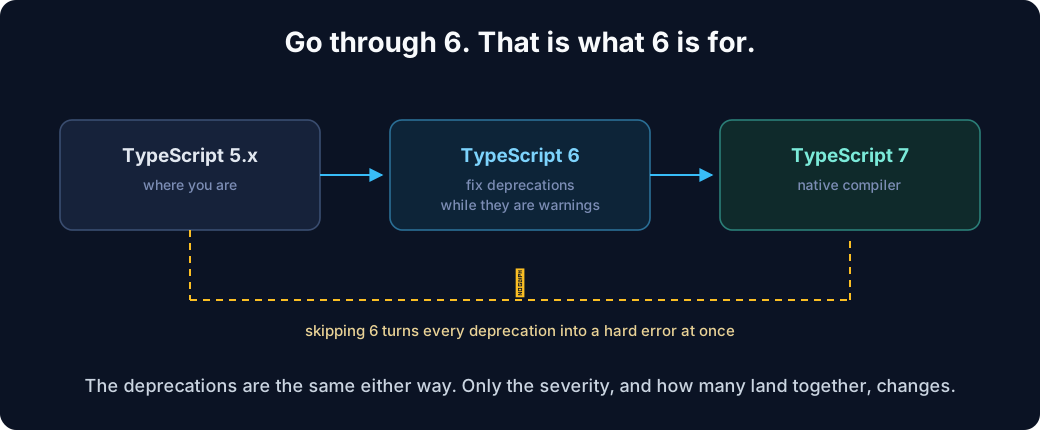
The deprecations are the same either way. What changes is the severity, and how many of them land on you simultaneously. Jumping 5.x → 7 directly on a large production codebase means meeting all of them at once, as errors, in the same build where you have also changed compiler implementation - so when something breaks you get to guess which of the two caused it.
Validating against 6 first separates those variables. That is worth more than the week it costs.
The big one: there is no compiler API
If you build tooling, this is the section that matters.
TypeScript 7.0 ships without a programmatic API. Code like this cannot assume TypeScript 7 provides the same implementation:
import ts from "typescript";

const program = ts.createProgram(/* ... */);
const checker = program.getTypeChecker();
A new - and explicitly different - API is expected in 7.1.
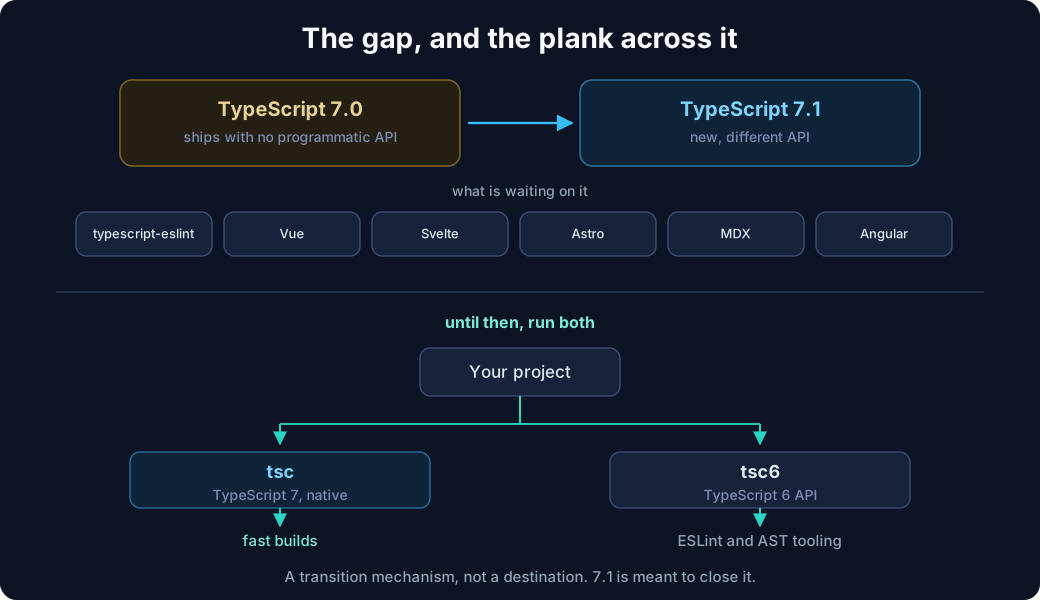
The list of things waiting on it is not niche: typescript-eslint, and framework integrations for Vue, Svelte, Astro, MDX and Angular. If your build depends on any of those, check their TypeScript 7 status before you plan the upgrade, not after.
The bridge across the gap
Microsoft ships a compatibility package so you can have the fast compiler and the old API at the same time. It provides a tsc6 binary and re-exports the 6.0 API, wired up through npm aliases:
{
  "devDependencies": {
    "@typescript/native": "npm:typescript@^7.0.2",
    "typescript": "npm:@typescript/typescript6@^6.0.2"
  }
}
Read those two lines carefully, because the aliasing is the opposite way round from what you might expect. The name typescript resolves to the 6.0 compatibility package - so anything doing import ts from "typescript" keeps working unchanged - while the native 7.0 compiler is installed under a different name and gives you tsc.
That is deliberate. The tooling that would break is the tooling that imports by name, so the name is what keeps pointing at the old API.
This is a transition mechanism
Running two compiler versions is a state to pass through, not to settle in. You are type-checking with one implementation and linting against another, and while they are meant to agree, "meant to" is doing real work in that sentence. Set yourself a checkpoint at 7.1 rather than letting the arrangement quietly become permanent.
JavaScript and JSDoc projects carry more risk
If your codebase is predominantly .ts and .tsx, this section is minor. If you lean heavily on JavaScript with JSDoc annotations, it isn't.
TypeScript 7 removed a number of older Closure-era behaviours in .js analysis, including:
- values used directly as types, where
typeofis now required - standalone
@enum - standalone
?as a type @classturning a function into a constructor- Closure-style function syntax such as
function(string): void
The intent is to make .js analysis behave more like .ts analysis, which is the right direction. But it means a JSDoc-heavy codebase can hit real breakage in a release that is otherwise advertised as behaviour-preserving - and the advertising is what will catch people out. "Should behave identically" is a claim about .ts.
What TypeScript 7 actually represents
The interesting statement isn't TypeScript 7 has feature X. It's this:
TypeScript changed its runtime architecture while deliberately preserving the language.
Rewrites that change both at once tend to fail, because when something breaks you cannot tell which half did it. Holding the language still is what makes a port of this size survivable - and it is also why the release feels anticlimactic if you only read the changelog looking for syntax.
What it buys is headroom. Type checking and editor responsiveness have been the practical ceiling on how large a TypeScript codebase can grow before the tooling becomes the bottleneck. That ceiling just moved by roughly an order of magnitude.
The migration cost is real and mostly concentrated in three places: the changed defaults, the deprecations you skipped, and the missing compiler API. None of them is subtle once you know to look. The API gap is the only one with a hard dependency on someone else's timeline.